

Learn How to Use Prusa Slicer: Step-by-Step Tutorial
How to Use Prusa Slicer Introduction
PrusaSlicer is one of the most powerful slicing tools available for 3D printing enthusiasts. Whether you’re brand new to 3D printing or looking to refine your skills, learning how to use PrusaSlicer will help you unlock better print quality, faster slicing, and more control over your projects.
In this tutorial, I’ll walk you through the basics of PrusaSlicer and share some excellent YouTube videos that demonstrate each step in detail.
What is PrusaSlicer?
- Developed by Prusa Research, PrusaSlicer is a free, open-source slicing software.
- It converts 3D models (STL, OBJ, 3MF files) into G-code instructions for your printer.
- Compatible with Prusa printers and many other FDM printers.
Getting Started with PrusaSlicer
- Download & Install
- Available for Windows, macOS, and Linux.
- Official download page.
- Initial Setup Wizard
- Choose your printer profile.
- Configure filament and print settings.
- Importing Models
- Drag and drop STL files into the workspace.
- Position and scale your model.
Key Features You’ll Use
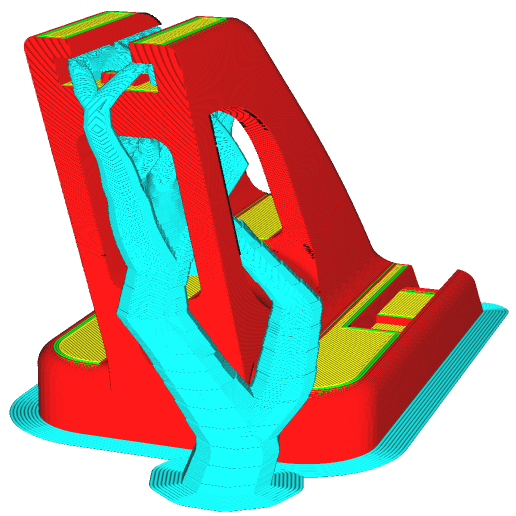
- Supports: Automatic and manual support generation.
- Modifiers: Apply different settings to specific parts of a model.
- Print Settings: Layer height, infill density, speed, and temperature.
- Preview Mode: Visualize toolpaths before printing.
Video Tutorials You Should Watch
Here are the videos I have found online that helped me learn Prusa Slicer:
- PrusaSlicer Tutorials – free videos from 3D Revolutions – this is actually a link to a playlist of videos, so if you know a little about the slicer and want advanced techniques, just watch the videos you are interested in learning more about.
- Prusa Academy – paid training from the creator of the tool – blog post describing academy
- PrusaSlicer Tutorials in Spanish – free videos from Centro3D – this is actually a link to a playlist of videos, so if you know a little about the slicer and want advanced techniques, just watch the videos you are interested in learning more about.
- Tutoriales de PrusaSlicer en español – vídeos gratuitos de Centro3D – En realidad, este es un enlace a una lista de reproducción de videos, por lo que si sabe un poco sobre el slicer y desea técnicas avanzadas, simplemente mire los videos sobre los que está interesado en aprender más.
Tips for Success
- Start with default profiles before tweaking advanced settings.
- Use the preview mode to catch potential issues.
- Experiment with infill patterns to balance strength and speed.
- Save custom profiles for different filaments.
📜 History of PrusaSlicer
PrusaSlicer didn’t appear out of nowhere — it has its roots in one of the earliest open-source slicers.
- Origins in Slic3r (2011): The story begins with Slic3r, an open-source slicing project created by Alessandro Ranellucci within the RepRap community. Launched in 2011, Slic3r quickly became popular because it was free, flexible, and community-driven.
- Prusa Research Adoption (2016): For several years, Prusa Research relied on Slic3r as the default slicer for its printers. However, as the company grew, it needed faster development cycles and more advanced features. In 2016, Prusa forked the Slic3r codebase to create its own customized version, initially called Slic3r Prusa Edition (Slic3r PE).
- Rebranding to PrusaSlicer (2019): As the software matured and diverged significantly from the original Slic3r, Prusa officially renamed it PrusaSlicer in 2019. This marked the point where it became a fully independent project, though still open-source and licensed under the GNU AGPLv3.
- Continuous Development: Today, PrusaSlicer is actively maintained by Prusa Research with regular updates. It supports both FFF (Fused Filament Fabrication) and MSLA (Masked Stereolithography) printers, integrates with Prusa Connect for remote management, and connects directly to the Printables.com model library.
🔑 Why This Matters
- Community Roots: Knowing that PrusaSlicer is based on Slic3r highlights its open-source heritage.
- Rapid Innovation: The fork allowed Prusa to add features like modifier meshes, advanced supports, and SLA slicing much faster than the original project.
- Reliability: Because it’s backed by Prusa Research, users benefit from professional development and testing while still enjoying the flexibility of open-source software.
How to Use Prusa Slicer Conclusion
PrusaSlicer is a versatile tool that grows with your skills. By combining this written guide with the curated YouTube tutorials, you’ll have everything you need to start slicing smarter and printing better.